Jenny Everywhere's Infinite: Quark Time

The New Adventures of The Shifter
RSS
‹
  • About
  • We Recommend
  • Cast

Progress Has Been Made!

by ArdRhi on June 18, 2011 at 6:04 pm
Posted In: Blog

This week has been spent, very productively, I might add, on some of the project backlog.  The most egregiously-behind item on the list being the print issue of Volume 1.  I’m happy to say that Volume 1, Weak Interaction, has been sent to the printer.  The image files have been examined and found within spec, and I have paid the invoice, so work should begin on getting it ready.  Now, this does NOT mean that I’m going to have a skid of books delivered to my house, or picked up by Diamond, or something like that.  I wish. Someday, I’ll be that much in demand that I can order 1,000 copies of a book printed and feel secure of having someplace for them to go in real time.

No, I’m using one of the Print-On-Demand houses, Ka-Blam Digital Printing.  YES, I know, some of you have worked with ComiXpress and think they’re better, but frankly, I can’t find enough information either way to make me choose at this point, so I decided to try Ka-Blam and see how it goes.  (I think the most deciding factor is that ComiXpress hasn’t updated the blog on their front page since January.  That worried me.)

So far, the only issues have been pretty much endemic of the entire industry, and not their fault.  No one anywhere can get the whole ISBN/UPC barcode thing right unless you scream a bit first, and no one seems to have a ready answer for “where do I get JUST ONE UPC barcode, if I don’t want to use one of yours?”  I ended up getting a UPC code with the correct extension for a comic book issue number from a third party supplier, and if it’s not right at this point, it isn’t my fault, no one else knew the right answer, either.  No, you don’t go to Bowker for it.  That’s an ISBN, you only put those on trade paper graphic novels, not floppy comics.  Nor do you go to GS1 unless you want to pay through the nose for a prefix for a block of 100 UPC codes and a yearly service fee. *Sigh*

The only other issue was that, when I printed a test galley of my pages at home, everything looked really dark.  I showed them around, and what I heard from pros was that it’s a common problem — what looks right on the screen prints too dark, so you have to bump up the brightness without oversaturating.  So I had to adjust the colors, do a test print, then adjust everything so it looked right on paper.  The files I saved look a little garish and “hot” on the screen, but print nice and clear and sharp, without being oversaturated.  The printer accepted them, so I guess they didn’t look too bad to them.  I took the opportunity to clean up some of my earlier art and dialogue balloons that didn’t look as good as I liked.  You can still see how my skill improves over time (wince) but at least it’s easier to read.

As soon as the printer gets done, it should be available for purchase in paper form at Indyplanet.  I’ll let you know when it finally goes live.

I’m also working on the next arc, and studying Photoshop.  I also need to do some work on rearranging the studio to make work a little easier.  Things are getting a bit cluttered and cramped around here, and it’s causing some problems. There will be a Short this week, and perhaps next, if I don’t have the arc ready to go yet, but at least you know it’s for a good cause.
└ Tags: ISBN, Ka-Blam, Print-On-Demand, UPC, Volume 1
  Comment

Additions and Invasions

by ArdRhi on June 10, 2011 at 7:54 am
Posted In: Blog

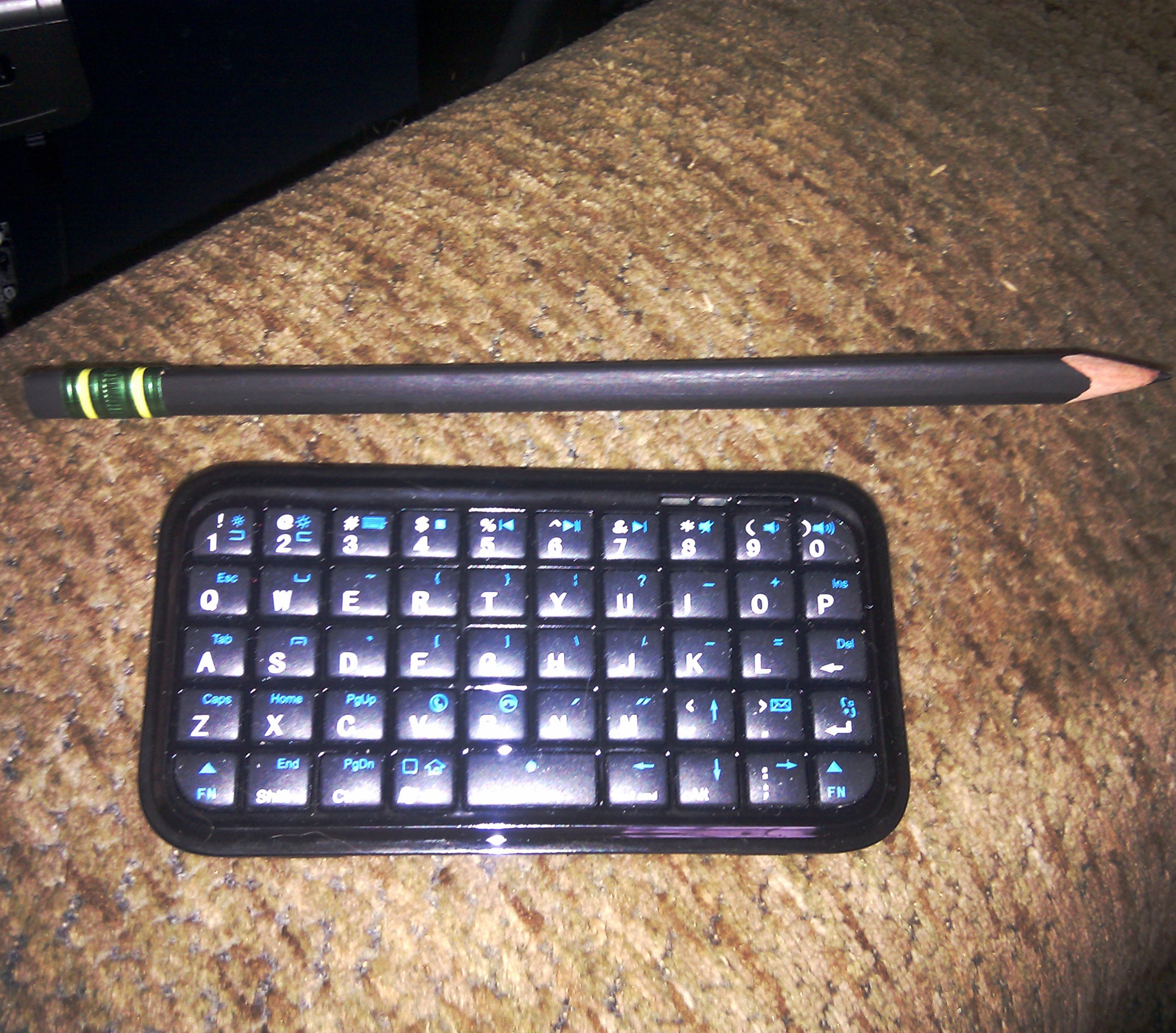
The past week or two have been a little interesting.  I’m making progress with my Photoshop studies, but I ran into a minor issue.  The way my “workstation” is laid out, there isn’t much room for a keyboard while I have my tablet on my lap, which makes using keyboard shortcuts a little tricky.  I was looking at small keyboards to try to solve this, but before I could order one, my partner suggested an interesting device for our phones – micro-sized Bluetooth keyboards.  Well, I’m already using Bluetooth for the tablet…so I tried pairing the tiny keyboard (see picture) with the PC.  It works beautifully, allowing me to do dialogue and keyboard shortcuts without moving my tablet.  These little keyboards are available all over the net, for prices ranging from $25 to $60, depending on where you get them.

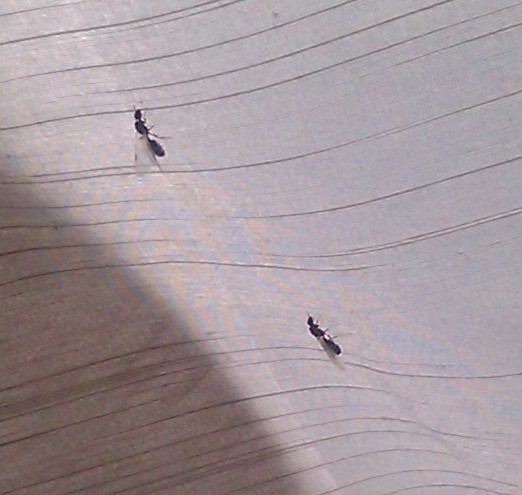
But this week has been a mess. The corner of the living room where I have my “studio” has suddenly erupted in an infestation of carpenter ants (see picture)  These winged monstrosities are crawling up the wall, the window, the curtain, flying around (yes, they have wings, damn them!) and are driving me nuts.  I hate bugs.  I had to arrange for the Orkin man to come out, which he did on Tuesday, right in the middle of my day, and disrupted my schedule.  But these things haven’t stopped coming up the damned wall!    So I sent an email to Orkin, to find out when these stupid things are supposed to DIE!

If the comic is late, this is why. I find these things to be a major distraction, right around my workstation like this.

└ Tags: Carpenter Ants, Mini Bluetooth Keyboard
2 Comments

Scaling Economies

by ArdRhi on May 23, 2011 at 7:03 am
Posted In: Blog

Wow, add a random factor and suddenly things change.

A few weeks ago, I found that wonderful suite GIMP Paint Studio, and bemoaned my inability to afford Photoshop.  Then my birthday rolled around, and I got a new tablet – a Wacom Intuos 4 Wireless.  Let me tell you, that’s a great tablet.  It cut the cord between the tablet and the machine, and has improved my work a lot, just by giving me a larger working area and a more sensitive stylus.  The buttons on the tablet help a lot, too.  But one thing I didn’t expect was a software bundle and upgrade deal included with the hardware!

Wacom offered a copy of Photoshop Elements 9 as a download, which I took (along with a couple of other things).  But that entitled me to an upgrade to Photoshop CS5 at a drastically reduced price, something I could actually afford!  So now I have a full, legal, and supported copy of Photoshop CS5, which I am methodically learning how to use.  I have a couple of different online video tutorial sites (Adobe uses Lynda.com), and several books that caught my eye by Steve Caplin.  I’ve already learned some techniques for Photoshop that I’ve been able to apply over in GIMP that have improved my work, and I see that trend continuing.

It will be a while before I start using Photoshop directly.  There’s a LOT to absorb, and it’ll take some practice before I’m ready to switch the comic over to it.  But I’m already getting a lot of benefit from what I’m learning.

└ Tags: How To Cheat In Photoshop, Lynda.com, Photoshop CS5, Photoshop Elements 9, Steve Caplin, Wacom Intuos 4 Wireless
1 Comment

Running a little late

by ArdRhi on May 1, 2011 at 3:58 pm
Posted In: Blog

This week’s installment is running a tad late.  I’ll try to have it up sometime Monday.  Technically, that’s not really late, as I do say I update Mondays, but I’ve been putting it up on Sunday nights so it’s fresh for the Monday morning crowd.  But it’s a complex page, and I’ve had some business to attend to that’s taken me away from the tablet.

On a positive note, my visit to the Comic Geek Speak Super Show was an unqualified success.  I chatted with some great people, got some great advice, bought some great items, sat in on a great panel, and my partner Maggie won a door prize.  Even the hot dogs were good.  The only downside was that it wore me down to nothing and I ended up in a lot of pain, but you know what they say about that and “no gain”.

I met some wonderful people who gave me wonderful advice, too many to name fairly.  To all of you, who took time to encourage me, time you didn’t have to spend but did anyway, thank  you.

└ Tags: advice, Comic Geek Speak Super Show, fun
  Comment

Oooh, New Toy!

by ArdRhi on April 14, 2011 at 4:15 pm
Posted In: Blog

I’ve probably mentioned that I don’t use Photoshop for my art — can’t afford it, wahh.

And yes, I’ve seen the latest news that Adobe is adding a subscription-based distribution format, so you can basically rent the software for a low monthly fee.  Frankly, I’d rather rent a refrigerator from the local Rent-Your-Life-Away Center.  At least they apply the rental towards owning the thing…at three times retail.  Adobe doesn’t do that.  You rent and rent and rent, and you never, ever own a license outright, no matter how long you pay.  If you want to switch to buying a licence, you start from zero.

But that’s ok.  I use GIMP, the Gnu Image Manipulation Program.  The only thing I don’t like about it is that it doesn’t do CMYK, it only does RGB, so I can’t go to some of the higher-end printing houses.  I have to stick with the ones I’m using, that support RGB, convert to CMYK, or get Photoshop, which supports it natively.  I can get a plugin for GIMP that produces CMYK separations if I need them.  I don’t need them, at least not right now.  If someone knows a more compelling reason, feel free to comment.  (Also feel free to buy me a copy of Photoshop. *grin*)

But that’s not the good part.  Today, I happened across a cool add-on set for GIMP that increases my ability to do Cool Stuff.  It’s called GPS, Gimp Paint Studio.  The site describes it as: “a collection of brushes and accompanying tool presets. Tool presets are a simply saved tool options, highly useful feature of the GIMP.”  Sounds simple, almost trivial.  It’s not.  Part of the problem with any tool like GIMP, or Photoshop, is the massive amount of “knobology” involved, how to tweak and set and poke it into doing all the really nifty and cool stuff, like how to make the brush look like graphite, or like an exploding fire, or like a glowing sunset.  If you’ve taken a dozen classes, or worked with it for ‘steen thousand hours, or were one of the devs and know every little tweak, you probably can do it all in your sleep and make it look easy.

“Just renoberate the jitter slider on the bump map redirector, set the layer mode to decomfistulate with a 50% instil level, and make sure the tweeter isn’t overdriven, and you can make something that looks exactly like radioactive gummy worms.”

Yeah, just that easy.

Or you can install something like GPS, that collects a pile of tools and brushes and tool presets (stored knobology), and you’ve got some great starting points for some nifty work.  That doesn’t mean there isn’t anything to learn.  I spent the morning and half the afternoon watching tutorial videos and reading the manual, trying stuff with my jaw hanging open.  About the sixth time you say “oooh, WOW, so that’s how they did that!”, you realize you have something really neat.  And when you try doing it yourself and see that it’s not something you need Commander Data next to you to replug all the isolinear chips every time you want to change options — nor will you cause an EPS conduit rupture, blow up your production system, and scuttle your only means of producing actual work, it’s really a boost to your morale.

I expect that over time, I’ll be able to produce even better artwork using this tool, and produce it easier.

Watch a sample video: GPS Presets Samples

└ Tags: Brushes, Gimp, GPS, Image Tools, Photoshop, Presets
1 Comment
  • Page 4 of 6
  • « First
  • «
  • 2
  • 3
  • 4
  • 5
  • 6
  • »

Archives

©2010-2013 Jenny Everywhere's Infinite: Quark Time | Powered by WordPress with ComicPress | Subscribe: RSS | Back to Top ↑